
Notifications
The notifications subsystem tracks deferred user decisions, configuration errors, unresolved state problems, connectivity loss, and other conditions that deserve attention but should not block interaction with tmux. Entries come in two severities: warnings (opt-in decisions and errors worth escalating) and info items (lower-severity transient messages).
When one or more warnings are active, a ⚠ symbol appears in the Mux-o-Tron along with a count. Clicking the badge, or invoking the notifications action (position I on the Main Menu Functions tab), opens a single review surface that walks through every pending entry.
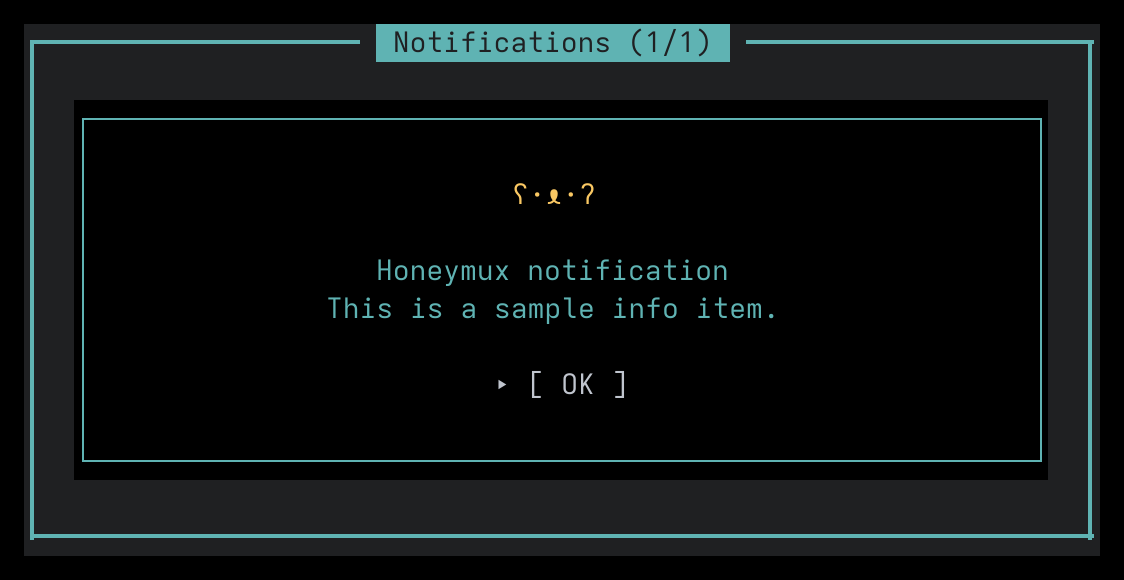
The review frame
Section titled “The review frame”Opening the notifications action wraps the current pending entry in a bordered frame labeled Notifications (1/N), where N is the total number of queued entries. The same frame hosts both warnings and info items — only the border color and inner dialog differ.
Dismissing or resolving the current entry advances automatically to the next one; when the queue is empty the frame closes. Clicking the darkened backdrop outside the frame closes the review without touching the underlying entries — they remain pending until actioned individually.
What shows up here
Section titled “What shows up here”The review queue is built from three sources (see src/app/hooks/use-notifications-review.ts):
- SSH connection errors. One entry per remote server that failed to connect or lost its session. The per-entry dialog is the same SSH error dialog shown outside the review. Dismissing permanently removes the warning; the entry reappears if the server errors again.
- Deferred agent-install decisions. When an agent integration detects a supported binary but you chose
Skipat the first-run prompt, the pending decision parks here until you install the hook or answerNever. See Agent Integrations. - Info items. Currently used for post-index conversation counts (one per agent, after Conversations finishes indexing local history) and the one-time privileged-pane tint notice.
Warnings in the queue are ordered by source: SSH errors first (oldest timestamp first), then deferred agent decisions, then info items.
Info items
Section titled “Info items”Info items use a dedicated low-severity dialog with a bear-face mascot (ʕ·ᴥ·ʔ) and no full-screen backdrop. Outside the review frame they are non-modal: the rest of the UI stays interactive, and a single OK button (or a left-click on the dialog body) dismisses the message.
Inside the review frame the same dialog renders with its backdrop suppressed — the frame supplies its own — and acknowledging advances to the next queued entry.
Resolving
Section titled “Resolving”Most entries self-clear once the underlying condition is fixed: an SSH server reconnects, an agent hook gets installed, or the info-item acknowledgement is recorded. A few offer inline actions in the per-entry dialog (install/skip/never for agents, dismiss-permanently for SSH errors). One-time info items, including the privileged-pane tint notice, persist their dismissal to ~/.local/state/honeymux/dismissed-notices.json so they do not return on the next launch.
Screen captures powered by Honeyshots
Copyright © 2026 Aaron Campbell · Apache 2.0