
Profiles
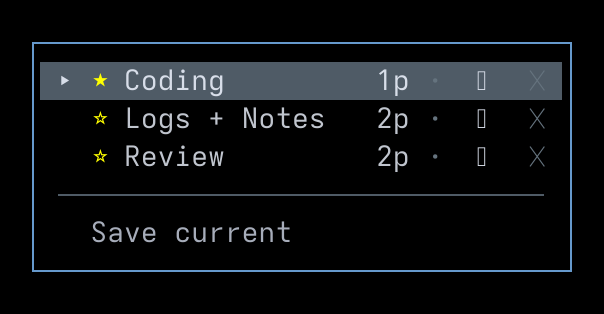
A layout profile is a saved snapshot of the current tmux window’s pane layout together with an optional startup command for each pane. Applying a profile opens a new window, recreates the pane split, and — if commands were recorded — types each one into the matching pane. The dropdown is reached via P from the Main Menu, or via a bound profiles key binding.
Saving a profile
Section titled “Saving a profile”Choose Save current at the bottom of the dropdown, type a name, and press Enter. Honeymux captures the tmux layout string for the active window and counts the panes from it. Duplicate names are rejected inline with Name already exists; pick a different name or cancel with Escape.
Immediately after a save, the dropdown drops into command-editing mode so you can record a startup command per pane (see Editing per-pane commands). Leave every line blank to keep the profile as a pure layout snapshot.
Applying and favoriting
Section titled “Applying and favoriting”Selecting a profile row (click, or Enter on the focused row) opens a new tmux window, kills any extra panes, applies the saved layout, and sends each recorded command to its pane as keystrokes.
The star icon (☆/★) to the left of the name toggles the favorite flag. At most one profile is the favorite at any time — starring a second profile clears the first. The favoriteProfile action (shown as Fav profile / F in the Main Menu Functions tab) applies the current favorite directly, skipping the dropdown.
Renaming, deleting, editing commands
Section titled “Renaming, deleting, editing commands”Each profile row carries up to three trailing icons. Arrow-right from a focused row moves the highlight across them; arrow-left moves it back to the name.
⚙— edit per-pane commands (see below). Lit when commands are set, dim when none are.✎— rename. Opens an inline input pre-filled with the current name; Enter commits, Escape cancels.✕— delete. Opens a confirm prompt showingDelete "<name>"?; pressyto confirm orn/Enter/Escape to cancel.
Editing per-pane commands
Section titled “Editing per-pane commands”The command editor steps through the panes one at a time, prompting Pane 1/N command, Pane 2/N command, and so on. Type the command you’d like sent to that pane on profile apply, or leave the line empty to send nothing. Enter advances to the next pane; on the final pane, Enter saves all commands to the profile. Escape cancels and discards edits.
Commands are stored as parsed argv arrays. When the profile is applied, each argv is re-joined with shell-safe quoting and sent to the target pane as if you’d typed it — Honeymux does not press Enter for you, so include a trailing newline (or use the shell’s usual submission key) if you want the command to run.
Storage
Section titled “Storage”Profiles are persisted as JSON at ~/.local/state/honeymux/layout-profiles.json. The file is rewritten on every save, rename, delete, favorite toggle, and command edit. Each entry stores the profile name, the raw tmux layout string, the pane count, a savedAt timestamp, the optional favorite flag, and the optional per-pane commands array.
The file is safe to read but not intended for hand-editing while Honeymux is running — the in-memory list is the source of truth and overwrites the file on the next change.
Screen captures powered by Honeyshots
Copyright © 2026 Aaron Campbell · Apache 2.0