
Screenshots
The screenshot feature allows you to capture and export the contents of a tmux pane to a PNG image file.
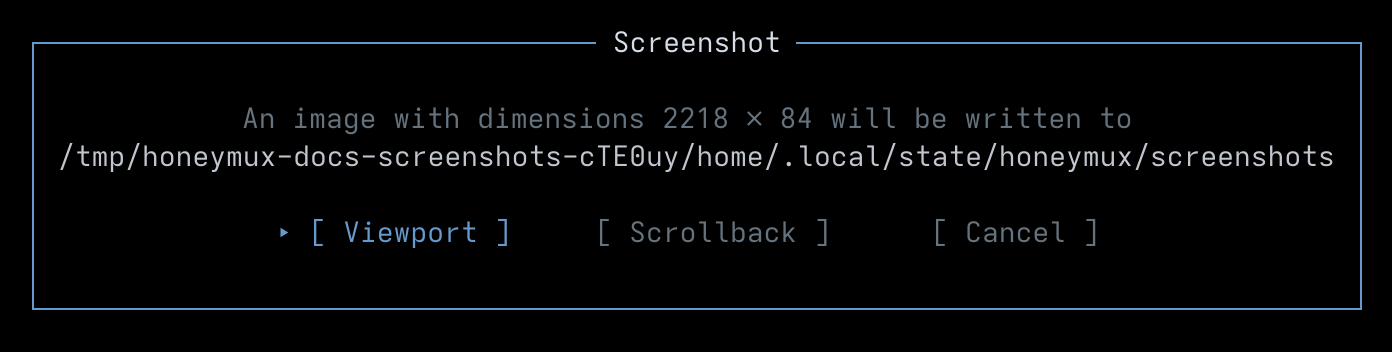
XXX TODO: Fix weird path in screenshot
Triggering
Section titled “Triggering”Open the Main Menu with Ctrl+G and press H, or press any key bound to the screenshot action. A dialog appears asking whether to capture the viewport, the scrollback, or cancel. The selected button is driven by arrow keys, Tab/Shift+Tab, or the mouse; Enter or Space confirms, and Escape (or pressing the screenshot key again) cancels.
Viewport vs scrollback
Section titled “Viewport vs scrollback”Two capture modes are available: viewport and scrollback. When selected, viewport will capture the currently-visible pane contents while scrollback will capture the entire pane history buffer and dump a long-form image. Scrollback captures may be refused up front if the resulting image would exceed screenshotMaxHeightPixels pixels tall — the Scrollback button stays focusable so the dialog can explain why, but it will not fire.
After capture
Section titled “After capture”Short captures surface a Screenshot Saved dialog showing the output path, with a clipboard (⧉) button that copies the path via OSC 52 and an OK button that dismisses. Either Enter on the focused button or Escape closes the dialog.
If rendering the image takes more than a couple of seconds, the done dialog is replaced by a notice telling you Honeymux will raise a notification when the file write completes. Dismiss the notice and keep working; the saved path lands in the Notifications review surface when it is ready.
Where files land
Section titled “Where files land”To configure the output directory for screenshots, open the General tab in the Options dialog, which edits the screenshotDir key. The directory is created on demand, ~ is expanded, and files are named <session>-<window>-<pane>-<timestamp>.png when session metadata is available. A brief screen flash plays on capture unless you turn it off with screenshotFlash.
Screen captures powered by Honeyshots
Copyright © 2026 Aaron Campbell · Apache 2.0